Kia K4: Rear View Monitor (RVM): / Rear View Monitor operation
Contents:
Parking/View button
|
|
To manually activate the Rear View Monitor, simply press the Parking/View button (1). To deactivate the view at any time, press the same button again.
Rear view
|
|
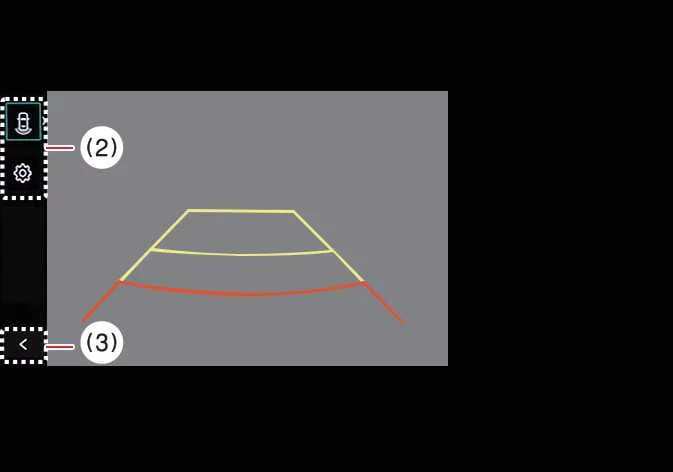
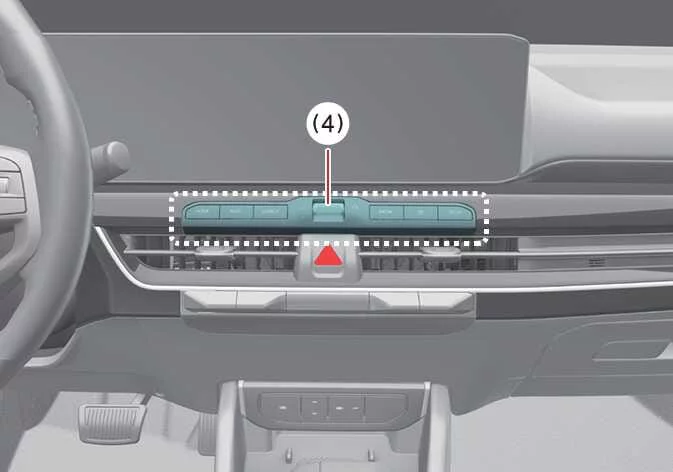
Additional interface controls include: (2) View switching button, (3) back button, and (4) infotainment system operation button.
Operating conditions
The Rear View Monitor in your Kia K4 will automatically turn ON when:
-
The gear shift is placed into R (Reverse).
-
You press the Parking/View button (1) while the transmission is in P (Park) or N (Neutral). Note that when in N (Neutral), the vehicle speed must be below 6 mph (10 km/h) to engage the Rear View function.
You can toggle between Rear Top View, standard Rear View, or Rear Wide View by pressing the View switching button (2) displayed on the screen.
Non-operating conditions
The system will automatically turn OFF if you perform any of the following:
-
Shifting the gear into P (Park).
-
Pressing the Parking/View button (1).
-
Tapping the back button (3) on the display.
-
Pressing the infotainment system operation button (4).
-
The transmission is in N (Neutral) or D (Drive) and the vehicle accelerates above 6 mph (10 km/h).
TIP
For your convenience, the Rear View Monitor will not automatically turn OFF as long as the gear remains in R (Reverse).
Extended Rear View Monitor
To assist you in executing parking maneuvers with greater precision, the Extended Rear View Monitor feature in your Kia K4 is designed to maintain the camera feed on the infotainment display even after you shift the gear from R (Reverse) into N (Neutral) or D (Drive).
Operating conditions
The Extended Rear View Monitor automatically activates when you transition the gear selector from R (Reverse) to N (Neutral) or D (Drive), provided that your Kia K4 is traveling at a speed of less than 6 mph (10 km/h).
Non-operating conditions
The Extended Rear View Monitor in your Kia K4 will automatically deactivate if any of the following occur:
-
You shift the transmission gear into P (Park).
-
You manually press the Parking/View button (1).
-
You press the back button (3) located on the Rear View Monitor screen interface.
-
You engage the infotainment system operation button (4).
-
The vehicle's forward speed exceeds 6 mph (10 km/h).
Rear Top View
|
|
|
Additional interface controls include: (2) View switching button, (3) back button, and (4) infotainment system operation button.
The Rear Top View provides a sophisticated bird's-eye perspective of your vehicle, allowing you to accurately gauge the proximity of your Kia K4 to surrounding obstacles or other vehicles. This enhanced viewpoint is invaluable for tight parking scenarios.
To engage the Rear Top View, press the designated Rear Top View button on your display.
TIP
-
The Rear View Monitor video will remain active as long as the gear is in Reverse (R), ensuring continuous visibility regardless of your selected display view.
-
Both the Rear View and Rear Top View modes can display dynamic Rear Parking Guidelines to assist with alignment. You can enable these by navigating to: Setup > Vehicle > Driver Assistance > Parking Safety > Camera Settings > Display Information > Rear Parking Guidelines on your Kia K4 infotainment screen. Please note that these guidelines are specific to the parking view and may not appear in all standard rear-view configurations.


Other information:
Kia K4 (CL4) 2025-2026 Owner's Manual: Storage compartments
The Kia K4 interior is designed with several convenient storage compartments to organize small items for both the driver and passengers: For your security, it is highly recommended not to store high-value items in any vehicle storage compartments to avoid potential theft. Always ensure that compartment lids are fully closed while the Kia K4 is in motion.Kia K4 (CL4) 2025-2026 Owner's Manual: Lane Keeping Assist (LKA)
When operating your Kia K4 at speeds above a certain threshold, the Lane Keeping Assist (LKA) system actively monitors road lane markings and edges. Designed to enhance your driving experience, Lane Keeping Assist can provide proactive steering assistance to help prevent your Kia K4 from unintentionally drifting out of its lane. Furthermore, the system is engineered to provide an alert if it detects that the vehicle is departing from its lane without the driver engaging the turn signal.